Blog · Product news · November 19, 2026 · 3 min read · Klim S
New in Dibba: Translate — Talk to Anyone Abroad, and See Prices in Your Currency
You can plan most of a trip from your sofa: book the room, download the map, save up for it day by day. What you can't plan is the conversation at the counter. The clerk says something friendly, then a number, and you nod without knowing what you've just agreed to pay. Starting today, Dibba helps with exactly that moment.
Translate puts both sides of a conversation on one screen
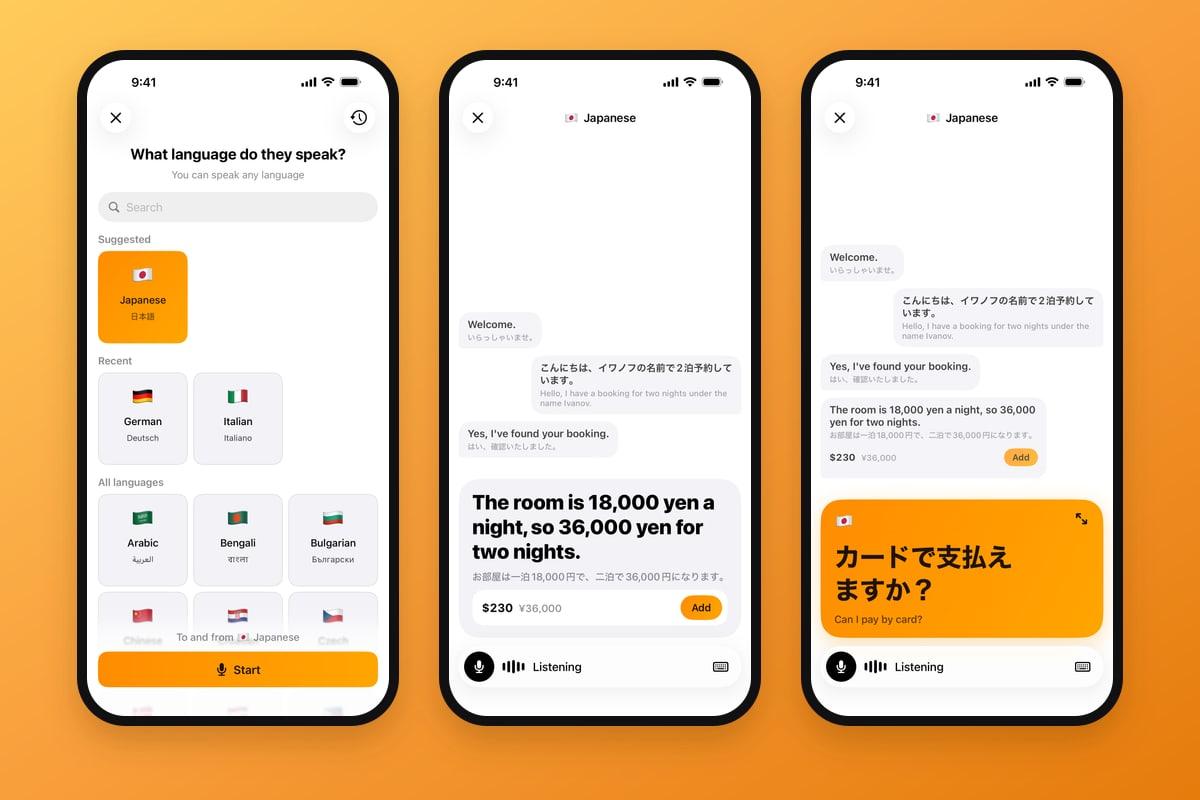
Translate is live two-way translation, built into Dibba. Tap it, pick the language of the person in front of you, tap Start and put your iPhone between you. After that you just talk.
"The room is 18,000 yen a night, so 36,000 yen for two nights."
What they say lands on a large grey card in your language, with their own words in small type underneath. What you say lands on an orange card in theirs, with their flag in the corner. Earlier sentences move up into a thread, like a chat, so either of you can glance back.
There's no button to hold and no turns to take.
You can try a sample conversation on the Translate page before you open the app.
Every price comes with a second number
This is the part an ordinary translator leaves out. When someone says a price, Dibba adds a row under the translation: $230 in bold, ¥36,000 beside it. The first number is in your home currency, the one your Dibba budget already runs in. The second is the price as it was said.
If they say just "1,500", Dibba takes the currency from the conversation so far.
Tap the row to see the rate behind it. It's marked as approximate, because your bank's rate will differ a little. Tap Add, and the price becomes an expense in your Feed, in the currency you'll actually be charged in. Nothing is added unless you tap.
A translator and a converter
The translator says "36,000 yen". You open a currency converter and type the number in. Later you open your budget app and type it again.
Translate in Dibba
"$230 · ¥36,000" sits under the sentence while the clerk is still talking. One tap on Add and it's in your budget.
Made for two people and one phone
- Show. Tap the arrows on the orange card and your sentence fills the screen in their language, easy to read at arm's length. It steps back when the next phrase starts.
- Type a phrase. In a loud place, open the keyboard and type. A typed phrase is translated like a spoken one.
- Pause. Tap the microphone when you turn to talk to your friends, and tap it again to carry on.
- 36 languages. From Arabic to Vietnamese. Dibba suggests the language of the country you're in and remembers the ones you used last.
Where to find it
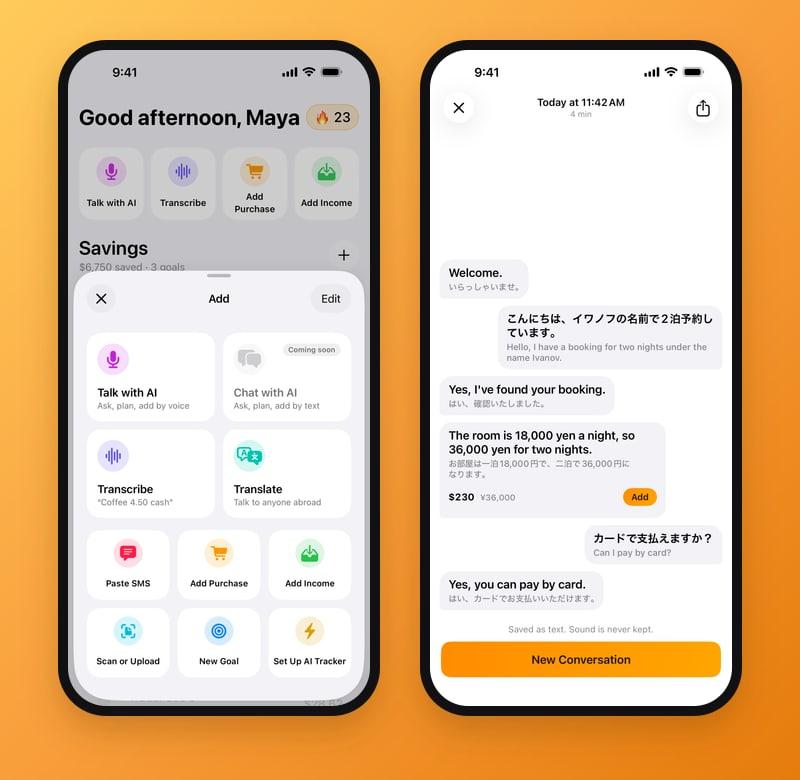
- In the Add panel. Tap the round + beside the tab bar. Translate is the card next to Transcribe.
- On Today, if you want it there. Tap Edit in the Add panel and add Translate to your quick actions.
- Under Profile. Conversations keeps everything you've translated, this week first and then month by month.
The details worth knowing
When you close a conversation, it's saved as text in both languages, and you can share it like any other text. Dibba asks for microphone access the first time you start.
Translate needs an internet connection. Like the rest of Dibba, it's on iPhone.
The price you hear is part of the budget
Dibba has tracked what you pay by card since the day you set it up, and it does that without a bank login. Abroad, a lot of spending is decided earlier than that, in a sentence you only half understand, in a currency you're still learning to divide by. Translate moves the budget to that moment. You know what was said and what it costs in your own money before you reach for your wallet.
FAQ
What is Translate in Dibba?
Translate is live two-way translation of a face-to-face conversation, built into the Dibba app for iPhone. You pick the other person's language and tap Start. The phone listens the whole time, shows what each of you said with its translation, and shows prices said aloud in your home currency.
Which languages does Translate support?
36 languages, including Arabic, Chinese, French, German, Hindi, Italian, Japanese, Korean, Portuguese, Russian, Spanish, Thai, Turkish and Vietnamese. You pick the language of the person you're talking to, and you can speak any language yourself.
How does Translate show prices in my currency?
When a price is said in the conversation, Dibba adds a row under the translation with the amount in your home currency, the one your Dibba budget is in, and the amount as it was said beside it. Tap Add to save it as an expense. The home amount uses the day's reference rate, so it's approximate.
Does Translate work offline?
No, Translate needs an internet connection.
Ready to save for Your Dream?
Join thousands who are already saving with us — setup takes 2 minutes.
