Blog · Product news · November 9, 2026 · 4 min read · Klim S
New in Dibba: Transcribe — Say What You Spent, and AI Adds It
Most of your spending already files itself: your bank texts you, Apple Pay pings you, and Dibba reads both without a bank login. What's left is the stuff with no notification — the coffee you paid in coins, the taxi in cash, the market stall that doesn't take cards. Until today that meant typing. Now you can just say it.
Transcribe turns one sentence into transactions
Transcribe is a new way to add spending in Dibba, and it's in the Free plan. Tap it, say what you spent the way you'd tell a friend, and tap Send:
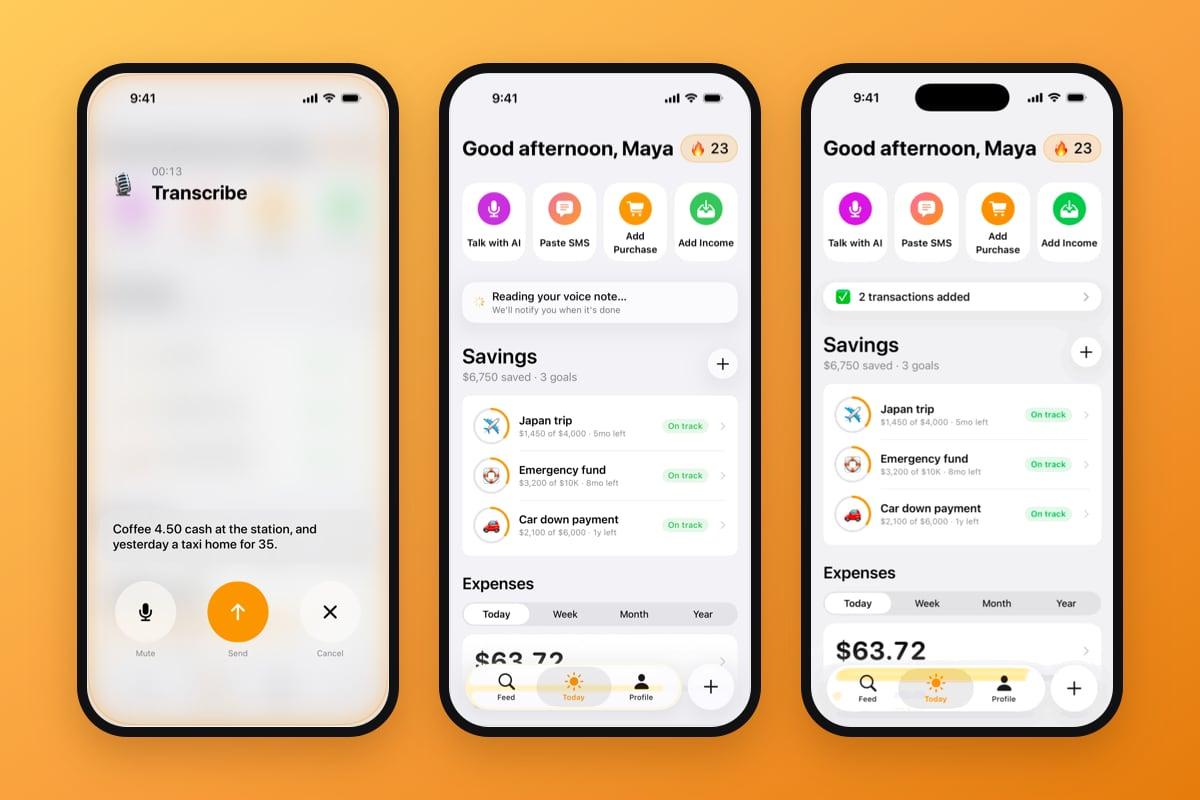
"Coffee 4.50 cash at the station, and yesterday a taxi home for 35."
A few seconds later there are two transactions in your Feed: a 4.50 coffee today and a 35 taxi yesterday, each with an amount, a category and a date. There's no form, no category picker and no date wheel to scroll back to yesterday. One note can hold as many purchases as you remember, and the AI works out where one ends and the next begins.
The screen will look familiar if you've used Talk with AI: the same glass and glowing edge, a timer, and your own words filling the card as you speak. There are three buttons underneath: Mute, Send and Cancel.
The purchases with no notification are where tracking breaks
Cash isn't going anywhere. The Federal Reserve's Diary of Consumer Payment Choice still ranks it as the third most-used way to pay in the US, and in plenty of markets it's higher than that. Those payments never send an SMS, so they're the ones an automatic tracker can't see.
They're also the ones people stop logging. A cash coffee is too small to open an app for while you're holding the cup, so you tell yourself you'll add it tonight. By Thursday there are six of them, you only remember four, and the week's numbers are quietly wrong. Typing a backlog feels like homework, which is why manual entry is usually the first habit to go.
Speaking takes about as long as remembering. You say it while it's still in your head, and the bookkeeping happens somewhere else.
Typing it in
Open the app, tap +, enter the amount, pick a category, move the date back to yesterday, save. Then start again for the taxi.
Saying it
Tap Transcribe, say both purchases in one breath, tap Send. Amounts, categories and dates are filled in for you.
What happens after you tap Send
The screen closes straight away, so you don't sit and watch a spinner. The note goes to Dibba's servers and the AI reads it in the background.
On Today and in the Feed you'll see "Reading your voice note…" with "We'll notify you when it's done" underneath. When it finishes, the banner changes to "2 transactions added" (or however many it found) and you get a notification. Tap it and Dibba opens the transaction, or the Feed if there are several.
Sometimes there's nothing to add. "Remind me to buy milk" isn't a purchase, so you'll see "No transactions found" along with what Dibba heard and a Transcribe Again button. If something goes wrong on the way, Try Again resends the same words. The text stays on your phone for seven days, so you never have to say it twice.
Where to find it
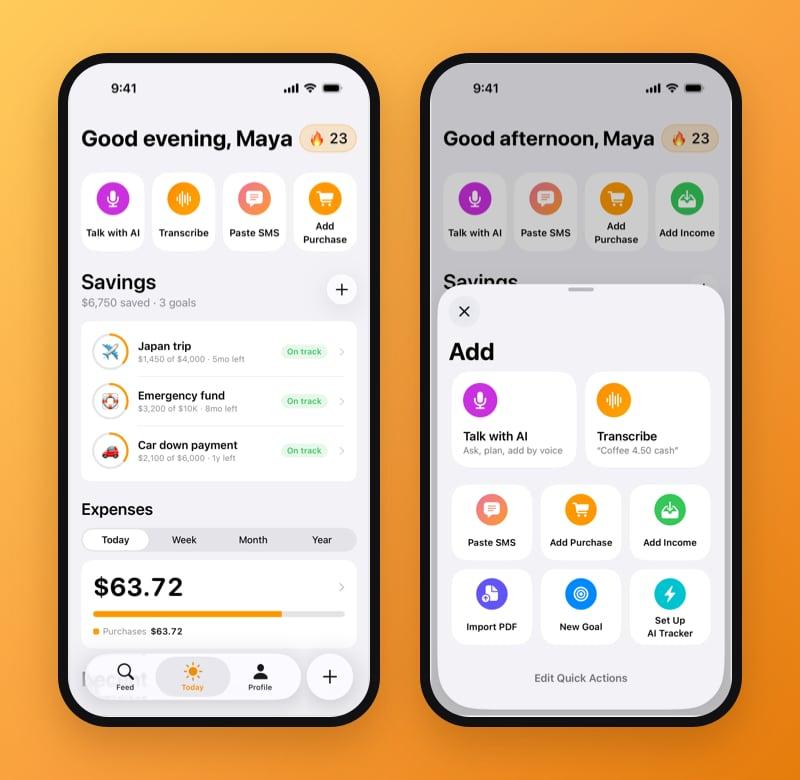
- On Today. Transcribe is the second quick action under the greeting, right after Talk with AI. Long-press the row to rearrange it.
- In the Add panel. Tap the round + beside the tab bar. Transcribe is the second voice card at the top.
- From the Home Screen. Long-press the Dibba icon and pick Transcribe to go straight to the microphone.
The details worth knowing
A note can run for up to five minutes, which is far more than "coffee and a taxi" needs. If you switch apps or lose signal partway through, the microphone stops but what you've said stays on screen, and Send still works.
Transcribe listens for the language your Dibba app is set to, plus the next language in your iPhone's preferred languages list, so a bilingual week doesn't need any settings. It isn't a phone call, either, so nothing turns up in your Recents. Dibba asks for microphone access the first time, and asks about notifications after your first note, because that's how the result reaches you.
It's part of the Free plan, with a limit of 50 voice notes a day. Like the rest of Dibba, it's on iPhone only.
And the Voice AI Agent is now the Voice Agent
One rename on our side: on this site, the Voice AI Agent is now simply the Voice Agent. In the app you'll still find it as Talk with AI, and nothing about it has changed: you call it, it knows your purchases, limits and goals, and it answers out loud. It's still part of Premium.
The two features are easy to tell apart. Transcribe writes things down: you talk, and transactions appear. The Voice Agent talks back: you ask where the money went this month or how to reach a goal sooner, and it works it out with you.
The last few purchases were always the hard part
Card payments and Apple Pay taps have been tracking themselves since the day you set Dibba up. Transcribe covers what's left over: the cash, the forgotten taxi, the dinner you split in cash. It takes one sentence, said while you still remember it, and you already know how to talk.
FAQ
Can I add expenses by voice in Dibba?
Yes. Tap Transcribe, say what you spent in your own words, and tap Send. Dibba's AI turns the note into transactions with amounts, categories and dates, and notifies you when they're added. You can find it on Today, in the Add panel behind the + button, and in the Home Screen quick actions.
Is Transcribe free?
Yes. Transcribe is part of the Free plan. You can send up to 50 voice notes a day, and each note can run up to five minutes.
Can one voice note add several purchases?
Yes. Say them one after another in the same note, the way you'd tell a friend. Relative dates work too, so "yesterday a taxi home for 35" lands on yesterday, not today.
Which languages does Transcribe understand?
It listens for the language your Dibba app is set to, plus the next language in your iPhone's preferred languages list. Most people can switch between their two everyday languages without changing anything.
What's the difference between Transcribe and the Voice Agent?
Transcribe writes things down — you speak, it adds transactions. The Voice Agent (it used to be called the Voice AI Agent) talks back — you call it to ask where your money went or to plan a goal. Transcribe is in the Free plan; the Voice Agent is part of Premium.
Ready to save for Your Dream?
Join thousands who are already saving with us — setup takes 2 minutes.
